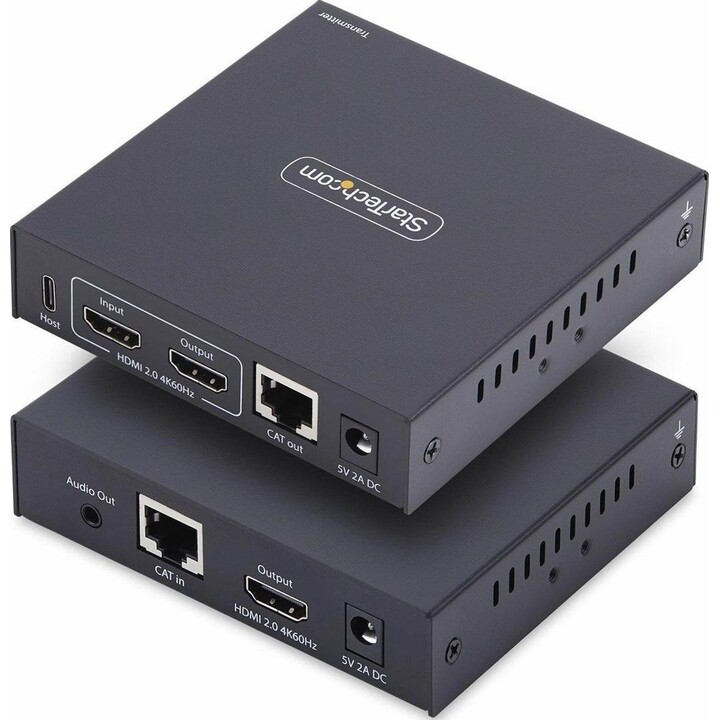



Startech.com IH2006 KVM Extender Transmitter and Receiver
- Extend and control a computer remotely over a TCP/IP network with keyboard, mouse, and HDMI monitor
- Supports HDMI 4K 60Hz resolution and 3.5mm audio pass-through
- Driver-free plug-and-play: compatible with Windows, macOS, Linux, and major hardware platforms
- Scalable from point-to-point to one-to-many by adding IP KVM receivers (sold separately)
- Durable metal housing with mounting kits for wall or under-desk installation
Main features of the IH2006-KVM-EXTENDER kit:
-
Allows to extend 4K HDMI signal at 60 Hz together with USB keyboard and mouse over standard IP network (Ethernet LAN).
-
Driver and software free installation; compatible with all operating systems: Windows, macOS, Linux and hardware based on Intel, AMD, ARM and Apple Silicon.
-
One-to-one and one-to-many (multiple receivers) function, ideal for centralised distribution and control in business or industry.
-
Stereo audio passthrough (3.5 mm) and RS-232 serial port for AV or automation applications.
-
Professional metal housing, wall, desktop or rack mountable.
-
Universal power supply included. Typical low power consumption (about 10 W per unit).
-
Security: controlled remote access and physical/local risk reduction in critical environments.
-
Brand

-
ReferenceIH2006-KVM-EXTENDER
-
In stock6 Items
-
ConditionNew
-
EAN130065030911511
-
MPNIH2006-KVM-EXTENDER
-
TypeKVM switch
| Brand | STARTECH |
|---|---|
| Country | Netherlands |
| Address of origin | Siriusdreef 17-27, 2132 WT Hoofddorp |
| EU responsible person | StarTech.com Europe LLP |
| Address | Boeing Avenue 8, Schiphol-Rijk, Netherlands, 1119PB |
| [email protected] | |
| Phone | 31203699300 |
Safety warnings
General warnings for this type of product. Always follow the manufacturer's instructions.
- Read the manufacturer's instructions before installing or using the appliance and keep them.
- Connect it only to a mains supply of the stated voltage and use the power supply or cable provided.
- Do not use it with a damaged cable, plug or casing and do not open it: repairs by qualified personnel only.
- Protect it from moisture, liquids and heat, and keep the ventilation openings clear.
- Unplug it before cleaning and when it will not be used for a long time.
- Keep it out of the reach of children.
- At the end of its life, take it to a collection point for waste electrical and electronic equipment (WEEE).
12 other products in the same category







Viewed products
- Out-of-Stock

- New
- Out-of-Stock
- Out-of-Stock
- Out-of-Stock
- Out-of-Stock
- Out-of-Stock