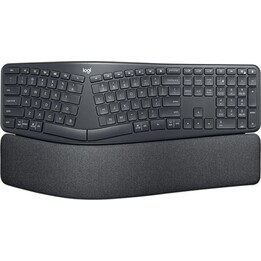
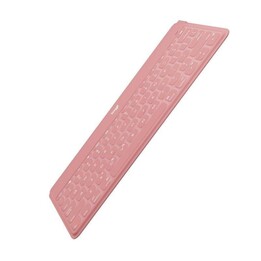
The R-Go Split Break is a wireless ergonomic keyboard made up of two separate halves, so you can type with your wrists straight and in a position that suits you. It is aimed at anyone who spends long hours at a desk and wants to look after their posture and remember to take breaks. It connects over Bluetooth and includes break software that uses LED colours to tell you when to pause.
Highlights
- Two independent halves: the keyboard splits into two parts that you can arrange as you like, which helps keep your wrists straight while typing and reduces strain on muscles, tendons and blood vessels.
- Break software with LED signals: the keys light up in different colours to show how long you have been working and when it is time for a pause, giving you simple feedback as you type.
- Low-profile, light touch: the flat design and scissor key mechanism keep your hands relaxed and make each keystroke light, which is easier on your fingers during long sessions.
- Bluetooth 5.0 wireless: connect without cables and switch between up to 3 devices, with a wireless range of up to 10 m.
- Rechargeable battery: the 500 mAh battery gives up to 140 h of use and recharges in 2 h through the USB Type-C port.
- Works across systems: compatible with Windows, Mac and Linux, and ready to use as soon as you connect it.
- Compact and portable: at 141 x 300 x 12 mm and 350 g, it is easy to carry between desk and bag, and the two halves join together with a magnet.
Technical specifications
Keyboard
| Recommended usage | Universal |
|---|
| Connectivity technology | Wireless |
|---|
| Device interface | Bluetooth |
|---|
| Keyboard key switch | Scissor key switch |
|---|
| Keyboard layout | QWERTY |
|---|
| Keyboard language | Portuguese |
|---|
| Pointing device | No |
|---|
| Numeric keypad | No |
|---|
| Keyboard key profile | Low-profile |
|---|
| Windows keys | Yes |
|---|
| Hot keys | Yes |
|---|
| Multimedia keys | Yes |
|---|
| Frequency band | 2.4 GHz |
|---|
| Bluetooth version | 5.0 |
|---|
| Country of origin | China |
|---|
Design
| Backlight | No |
|---|
| Island-style keyboard | Yes |
|---|
| Ergonomic design | Yes |
|---|
| Product colour | Black |
|---|
| Surface coloration | Monochromatic |
|---|
| Material | Aluminium, Plastic |
|---|
| LED indicators | Yes |
|---|
Features
| Wireless range | 10 m |
|---|
| USB connector type | USB Type-C |
|---|
| Cable length | 1.02 m |
|---|
| Detachable cable | Yes |
|---|
| Plug and Play | Yes |
|---|
Power
| Power source type | Battery |
|---|
| Battery life (max) | 140 h |
|---|
| Rechargeable | Yes |
|---|
| Battery recharge time | 2 h |
|---|
| Charging source | USB Type-C |
|---|
Battery
Mouse
System requirements
| Windows operating systems supported | Yes |
|---|
| Mac operating systems supported | Yes |
|---|
| Linux operating systems supported | Yes |
|---|
Weight & dimensions
| Keyboard dimensions (WxDxH) | 141 x 300 x 12 mm |
|---|
| Keyboard weight | 350 g |
|---|
| Weight | 350 g |
|---|
Packaging data
Packaging content
| Number of products included | 1 pc(s) |
|---|
| Receiver included | No |
|---|
| Adapters included | USB |
|---|
Other features
| Depth | 300 mm |
|---|
| Height | 12 mm |
|---|
| Width | 141 mm |
|---|
Manufacturer technical data.
Frequently asked questions
Can I change the layout of the two halves?
Yes. The keyboard consists of two separate parts that you can place in the arrangement you prefer, so you can type with your wrists straight. A built-in magnet lets you join them into a single compact keyboard when you want to move it or free up desk space.
How does the break software work?
The keyboard uses LED colour signals to give you feedback on your break behaviour, changing colour as you work so you know when it is time to pause. It works together with the R-Go Break Software.
How do I connect it and how long does the battery last?
It connects wirelessly over Bluetooth 5.0 and lets you switch between up to 3 devices. The rechargeable 500 mAh battery provides up to 140 h of use and takes 2 h to recharge via USB Type-C.
Which systems is it compatible with?
It supports Windows, Mac and Linux, and works with a PC, desktop or laptop. It is plug and play, so no complicated setup is needed.