FOUR MODES OF USE
Combo Touch has four usage modes to help you accomplish any task.
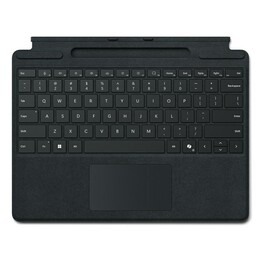
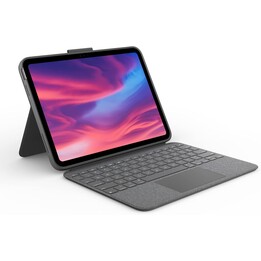
Typing mode: Dock the keyboard upright, remove the flip-out kickstand, and youre ready to start typing notes, emails, and more.
Viewing Mode: Detach the keyboard and remove the kickstand to watch movies and videos.
Drawing mode: Fully extend the flip stand for the perfect angle for taking notes or drawing with Apple Pencil or
Logitech Crayon.
Reading mode: Undock the keyboard—or dock it with the keys facing inward—to read books, articles, and more.
DISREGARDS THE KEYBOARD
When youre done typing, simply slide out the keyboard so you can draw, read, or watch videos with nothing to come between you and the iPad screen. Then use the 50-degree tilt of the adjustable flip-up stand to get the perfect viewing angle.
PROTECTION ADAPTED TO THE FORM
Its not just a matter of protection. It also gives you peace of mind. Combo Touch is made to fit your iPad, protecting the front, back and corners from scratches and bumps. Rest assured that your iPad is protected from slipping out of the case, and you can focus
on the task at hand. Even if you have to carry it from one room to another or take it out of the house.
PREMIUM EXPERIENCE
CLICK ANYWHERE
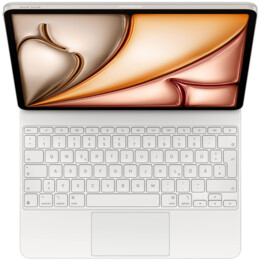
The new anywhere-pressable trackpad gives you more freedom, more control, and more precision for your everyday tasks in apps like Safari, Keynote, and Pages.
OUR LARGEST TRACKPAD1 COMPARED TO LOGITECH KEYBOARD CASES WITH TRACKPAD RELEASED IN 2020.
This is the largest trackpad weve designed for a keyboard case. A larger trackpad gives you more room to work using all the Multi-Touch gestures you know and love. Swipe, tap, pinch and scroll.
HIGH RESPONSE CAPACITY AND RELIABILITY
Premium navigation typical of Smart Connector technology, with no pairing required.
WRITE DAY OR NIGHT
Backlit keys with 16 brightness levels automatically adjust to the environment, so you can see them clearly and focus on your activity in any light. The shortcut keys at the top of the keyboard allow you to manually adjust the brightness.
WRITE LIKE ON A LAPTOP
Each Logitech keyboard is the product of more than 20 years of innovation, so your keystrokes are smooth, natural, and precise. Type comfortably for hours with keys that provide perfect tactile feedback.
FULL ROW OF SHORTCUT KEYS
You no longer have to search for the usual functions in the on-screen menus. Combo Touch gives you a full row of iPadOS shortcut keys. You can adjust volume and media controls, key brightness levels, etc. with one-touch access.
CAREFULLY CREATED FOR THE iPAD
OUR FINEST DESIGN
iPad now has a companion to match its sleek aesthetic: the thinnest keyboard case weve ever created with a trackpad.
SOFT FABRIC
The elegant outer fabric offers a great feeling both to the eye and to the touch. It is comfortable, attractive and looks good anywhere.
ONE-CLICK FEEDING AND PAIRING
Combo Touch instantly pairs with iPad via Smart Connector. And no batteries are included, because youll never need them—Combo Touch is powered directly by the iPad
- COMPATIBLE DEVICES
- Combo Touch for 11-inch iPad Pro (1st, 2nd, and 3rd generation)
- iPad Pro 11-inch (3rd generation)
- MODEL: A2377, A2459, A2301, A2460
- 11-inch iPad Pro (2nd generation)
- MODEL: A2228, A2068, A2230, A2231
- iPad Pro 11-inch (1st generation)
- MODEL: A1980, A2013, A1934, A1979
- DIMENSIONS
- Combo Touch for 11-inch iPad Pro (1st, 2nd, and 3rd generation)
- Height: 25.2cm
- Width: 18.93cm
- Depth: 1.69cm
- Weight: 574g
- SYSTEM REQUIREMENTS
- iPadOS 13.4 or later
- TECHNICAL SPECIFICATIONS
- modes
- 4 modes: Write, View, Draw, Read
- keyboard type
- removable keyboard
- Backlit keys
- Yes, with automatic adjustment
- viewing angles
- 10°-60°
- Power and connections
- Power through iPad Pro via Smart Connector
- Sheath
- Space to store Apple Pencil (2nd generation)
- Front, back and corner protection
- Access to all ports - Camera/iPad charging port
- Keyboard
- 16 levels of adjustable backlight
- Full row of iPadOS shortcut keys
- Touch Combo for iPad Pro 12.9-inch (5th generation)
- 19mm between center of adjoining keys
- 1mm key travel
- Combo Touch for 11-inch iPad Pro (1st, 2nd, and 3rd generation)
- 18mm between center of adjoining keys
- 1mm key travel
- Combo Touch for iPad Air (4th generation)
- 18mm between center of adjoining keys
- 1mm key travel
- Row of iPadOS shortcut keys (from left to right)
- Beginning
- Reduce screen brightness
- Increases the screen brightness
- On-screen keyboard
- Look for
- Key brightness is reduced
- Increase the brightness of the key
- previous track
- play/pause
- next track
- volume muted
- volume down
- Turn up the volume
- Blocking
- BOX CONTENTS
- keyboard case
- User Documentation