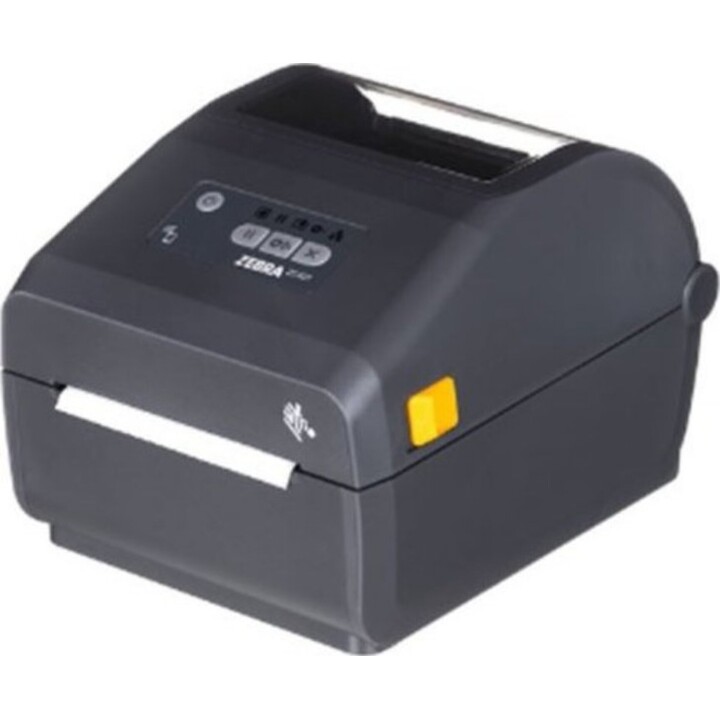



Zebra ZD421D Direct Thermal Label Printer 300 x 300 DPI 102 mm/s Wireless and Wired Ethernet Bluetooth
- Print method: Direct thermal
- Print resolution: 203 dpi (8 dots/mm)
- Max print width: 4.09" (104 mm)
- Max print speed: 6 ips (152 mm/s)
- Connectivity: USB 2.0, Ethernet
ZD421 Direct Thermal Label Printer
The Zebra ZD421 is a compact and reliable direct thermal label printer designed for on-demand printing in retail, healthcare, and light industrial environments. With a 203 dpi resolution and 6 ips print speed, it delivers crisp barcodes and text on labels up to 4.09 inches wide. The printer supports USB and Ethernet connectivity, making it easy to integrate into existing systems.
Built for durability and ease of use, the ZD421 features a simple media loading design and supports a wide range of label sizes. Its direct thermal technology eliminates the need for ink or toner, reducing operating costs. The printer is compatible with Zebra's Link-OS software for remote management and monitoring, ensuring high uptime and productivity.
| Print Method | Direct thermal |
| Print Resolution | 203 dpi (8 dots/mm) |
| Max Print Width | 4.09" (104 mm) |
| Max Print Speed | 6 ips (152 mm/s) |
| Connectivity | USB 2.0, Ethernet |
| Media Width | 0.75" to 4.49" (19 mm to 114 mm) |
| Media Roll Diameter | 5" (127 mm) OD |
| Core Diameter | 1" (25.4 mm) or 1.5" (38.1 mm) |
| Weight | 3.2 lbs (1.45 kg) |
| Dimensions (W x D x H) | 7.6" x 6.8" x 5.9" (193 mm x 173 mm x 150 mm) |
-
Brand

-
ReferenceZD4A043-D0EE00EZ
-
In stock5 Items
-
ConditionNew
-
EAN138596375242999
-
MPNZD4A043-D0EE00EZ
-
ColourBlue
-
Tecnología de impresiónTérmica directa
-
Battery includedNo
| Brand | Zebra |
|---|---|
| Country | USA |
| Address of origin | 3 Overlook Point, Lincolnshire, Illinois 60069 |
| EU responsible person | Zebra Technologies Corp. |
| Address | Calle Martinez Villergas, 52 Bloque C Madrid 28027 |
| [email protected] | |
| Phone | 34911237350 |
Safety warnings
General warnings for this type of product. Always follow the manufacturer's instructions.
- Read the manufacturer's instructions before installing or using the appliance and keep them.
- Connect it only to a mains supply of the stated voltage and use the power supply or cable provided.
- Do not use it with a damaged cable, plug or casing and do not open it: repairs by qualified personnel only.
- Protect it from moisture, liquids and heat, and keep the ventilation openings clear.
- Unplug it before cleaning and when it will not be used for a long time.
- Keep it out of the reach of children.
- At the end of its life, take it to a collection point for waste electrical and electronic equipment (WEEE).
12 other products in the same category



- Out-of-Stock


- Out-of-Stock
Viewed products
- New
- Out-of-Stock