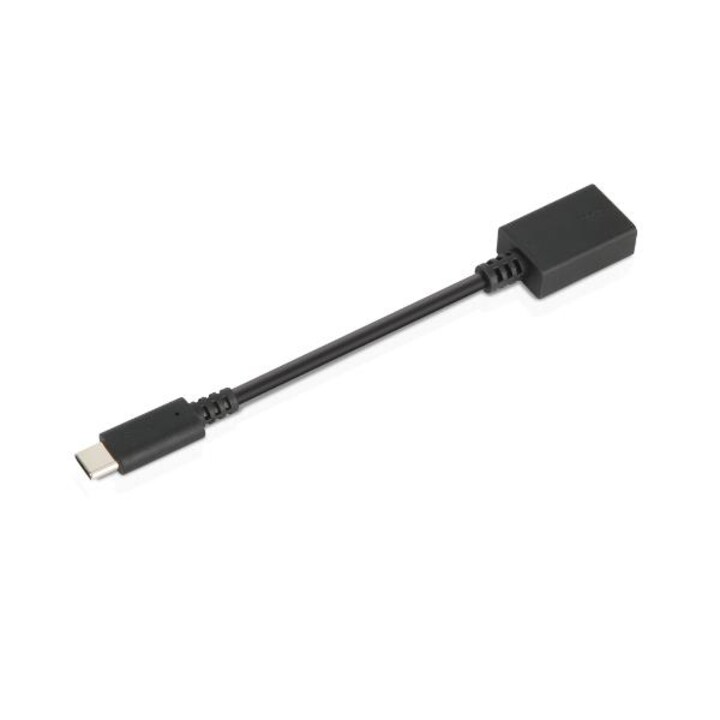

Lenovo USB-C to USB-A Adapter (4X90Q59481)
- Connector 1: USB-C Male
- Connector 2: USB-A Female
- Data Transfer Rate: Up to 5 Gbps
- Compatibility: USB-C devices to USB-A ports
- Color: Black
lenovousb-ctousb-aadapter
The Lenovo USB-C to USB-A Adapter (4X90Q59481) allows you to connect USB-C devices to standard USB-A ports. This adapter supports USB 3.1 Gen 1 speeds, enabling data transfer rates up to 5 Gbps. Its compact and lightweight design makes it easy to carry, ensuring you can connect your USB-C peripherals to older laptops or desktops without hassle.
Built with durability in mind, this adapter is compatible with a wide range of Lenovo laptops and other USB-C devices. Whether you need to connect a USB-A flash drive, mouse, or keyboard to a USB-C port, this adapter provides a reliable solution. Plug-and-play functionality ensures instant setup without additional drivers.
| Brand | Lenovo |
| Model | 4X90Q59481 |
| Type | USB-C to USB-A Adapter |
| Connector 1 | USB-C Male |
| Connector 2 | USB-A Female |
| Data Transfer Rate | Up to 5 Gbps |
| USB Standard | USB 3.1 Gen 1 |
| Color | Black |
| Weight | Approx. 10 g |
| Compatibility | Devices with USB-C port |
-
Brand

-
Reference4X90Q59481
-
In stock12 Items
-
ConditionNew
-
EAN130192158637471
-
MPN4X90Q59481
-
Battery includedNo
| Brand | LENOVO |
|---|---|
| Country | China |
| Address of origin | No. 6 Chuang Ye Road, Shangdi Information Industry Base, Haidian District, Beijing, 100085, China |
| EU responsible person | LENOVO SPAIN SL |
| Address | C/ PUERTO DE SOMPORT, 9 Madrid 28050 |
| [email protected] | |
| Phone | 34910878064 |
Safety warnings
General warnings for this type of product. Always follow the manufacturer's instructions.
- Read the manufacturer's instructions before installing or using the appliance and keep them.
- Connect it only to a mains supply of the stated voltage and use the power supply or cable provided.
- Do not use it with a damaged cable, plug or casing and do not open it: repairs by qualified personnel only.
- Protect it from moisture, liquids and heat, and keep the ventilation openings clear.
- Unplug it before cleaning and when it will not be used for a long time.
- Keep it out of the reach of children.
- At the end of its life, take it to a collection point for waste electrical and electronic equipment (WEEE).