- Out-of-Stock
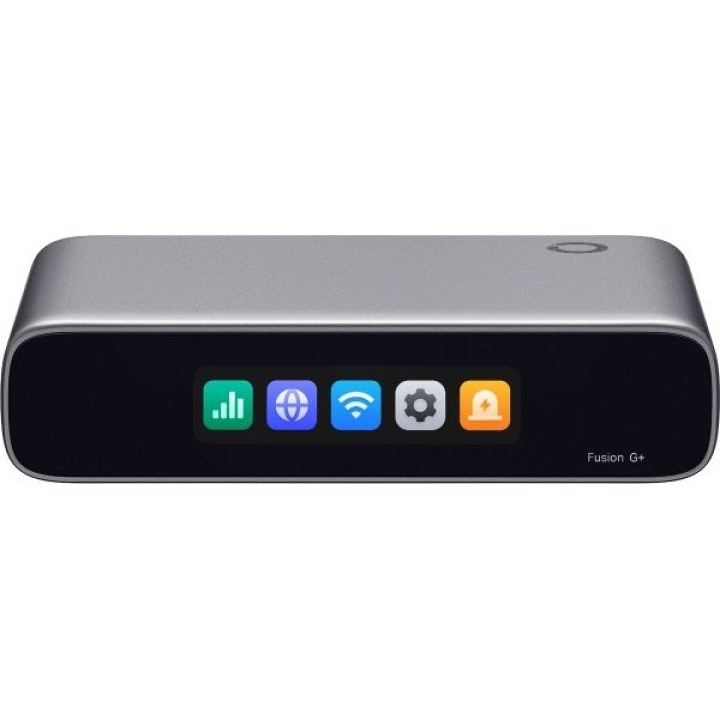
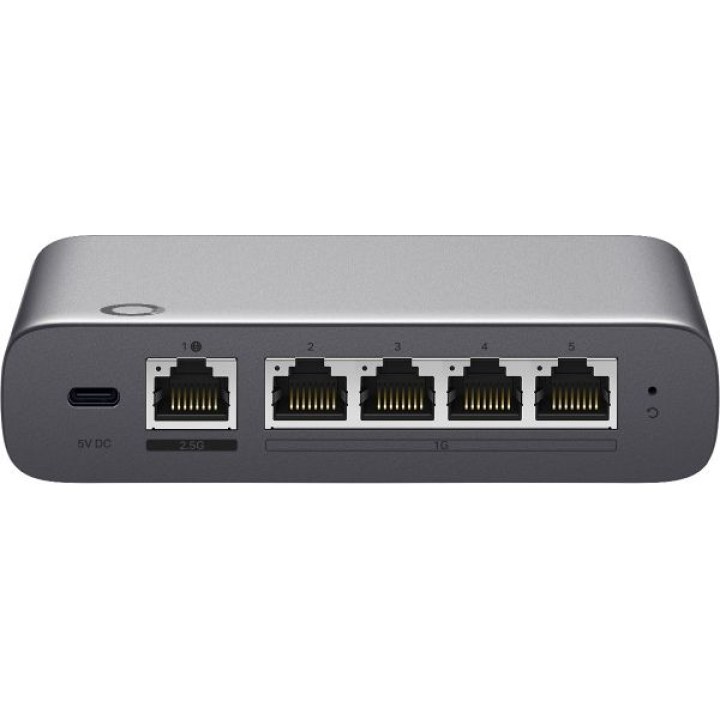
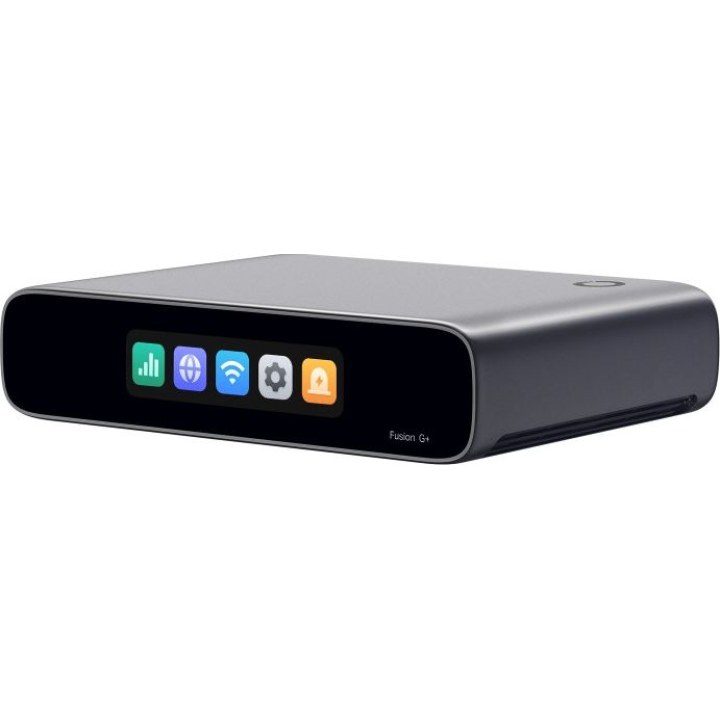

Fusion G+ Gateway
- Omada Fusion G+ network gateway with license-free cloud management and easy secure remote access
- Quad-core processor, 5 RJ45 ports (1× 2.5G WAN, 4× 1G WAN/LAN) and IDS/IPS throughput up to 2.1 Gbps
- Simple setup via in-app onboarding using Bluetooth and one-click device adoption
- Built-in touchscreen for rapid troubleshooting and one-click remote access via Omada LightLink VPN
- Flexible desktop, wall-mount or rack-mount installation
Fusion G+ Gateway
The TP-Link Fusion G+ is an Omada network gateway designed for simple setup, secure remote access and enterprise-grade performance. It combines license-free cloud management with in-app onboarding using Bluetooth and one-click device adoption, so you can get the network running without a complicated configuration process.
Inside, a quad-core processor powers the gateway, while 5 RJ45 ports (1× 2.5G WAN and 4× 1G WAN/LAN) support up to 4 WAN ports with load balancing and automatic failover. The Fusion G+ delivers an IDS/IPS throughput of 2.1 Gbps and includes a built-in touchscreen for rapid troubleshooting, reducing the need for on-site visits.
Advanced software features include application-based ACL, Auto QoS, Full-Mesh SD-WAN, content filtering, ad blocking and DPI. Secure one-click remote network access is available via Omada LightLink VPN, and the gateway can be installed on a desktop, wall-mounted or rack-mounted.
Main features
- Omada Fusion G+ network gateway with license-free cloud management
- Quad-core processor and 5 RJ45 ports: 1× 2.5G WAN, 4× 1G WAN/LAN
- Up to 4 WAN ports with load balancing and automatic failover
- IDS/IPS throughput of 2.1 Gbps
- Built-in touchscreen for rapid troubleshooting
- Bluetooth or Ethernet onboarding and one-click device adoption
- Desktop, wall-mount or rack-mount mounting options
Specifications
| Product | Fusion G+ |
| Type | Omada Fusion G+ Network Gateway |
| Management | License-free cloud management |
| Setup | In-app onboarding using Bluetooth and one-click device adoption; Bluetooth or Ethernet onboarding |
| Processor | Quad-core processor |
| Ports | 5 RJ45 ports (1× 2.5G WAN, 4× 1G WAN/LAN) |
| WAN | Up to 4 WAN ports with load balancing and automatic failover |
| IDS/IPS throughput | 2.1 Gbps |
| Display | Built-in touchscreen |
| Remote access | One-click remote network access via Omada LightLink VPN |
| Software features | Application-based ACL, Auto QoS, Full-Mesh SD-WAN, content filtering, ad blocking, DPI |
| Security | IDS/IPS, DPI, application-based ACL, content filtering, ad blocker, Safe Search, DNS security, firewall, protection against network attacks, protection against ARP attacks |
| WAN connection | Static IP / Dynamic IP / PPPoE / PPTP / L2TP / MAP-E / DS-Lite |
| Multi-WAN | Failover and load balancing |
| Networking | DHCP server, VLAN segmentation, bandwidth control, QoS, static routing, policy routing |
| NAT | Port forwarding / virtual servers / DMZ / ALG / UPnP / one-to-one NAT / NAT disable |
| Dynamic DNS | TP-Link DDNS, third-party DDNS, custom DDNS |
| IPv6 | Static IP / SLAAC / DHCPv6 / PPPoE / 6to4 tunnel / pass-through / non-address mode |
| Other protocols | Bonjour / mDNS, IGMP v2/v3 proxy |
| Built-in Omada OS applications | Omada Network App (network management) |
| Omada device management | Up to 30 devices (recommended) |
| Client capacity | Up to 300 connected clients (recommended) |
| Dashboard | Overview / Wi-Fi / Clients / Traffic; network topology |
| Monitoring and management | Health monitoring, automatic device discovery, switch ports, client management, reports, logs (alerts / events / audit logs) |
| Maintenance tools | Ping test, packet capture, terminal, cable test, interference detection, remote access, IntelliRecover |
| SNMP | v1/v2c/v3 |
| Wireless features | SSID, PPSK, WLAN optimization, portal |
| Bluetooth | Yes |
| Power adapter | USB-C power adapter; input 100-240 V AC, 50/60 Hz; output 5 V DC / 3 A |
| Operating temperature | -10°C to 40°C |
| Storage temperature | -30°C to 70°C |
| Operating humidity | 10%-90%, non-condensing |
| Storage humidity | 5%-90%, non-condensing |
| Certifications | CE, FCC, RoHS |
| Surge protection | 4 kV |
| ESD protection | ±8 kV (air discharge), ±4 kV (contact discharge) |
| Mounting | Desktop, wall-mount or rack-mount |
| Package contents | Fusion G+, Ethernet cable, charger |
| Dimensions | 130 × 95 × 30 mm |
| Colour | Black |
Frequently asked questions
Does the Fusion G+ require a license for cloud management?
No. The Fusion G+ offers license-free cloud management, providing easy and secure remote access.
How many WAN ports does it support?
It has 5 RJ45 ports (1× 2.5G WAN, 4× 1G WAN/LAN) and supports up to 4 WAN ports with load balancing and automatic failover.
How is the device set up?
Setup is simple via in-app onboarding using Bluetooth and one-click device adoption. Bluetooth or Ethernet onboarding is supported.
What is the IDS/IPS throughput?
The Fusion G+ provides an IDS/IPS throughput of 2.1 Gbps.
How can it be mounted?
It supports flexible mounting options: desktop, wall-mount or rack-mount.
It is for you if...
- You want an Omada gateway with license-free cloud management and secure remote access
- You need multi-WAN with load balancing and automatic failover
- You value quick troubleshooting through a built-in touchscreen
- You want advanced features such as application-based ACL, Auto QoS, Full-Mesh SD-WAN, content filtering and DPI
- You need flexible desktop, wall-mount or rack-mount installation
-
Brand

-
ReferenceFusion G+
-
ConditionNew
-
EAN131210002633253
-
MPNFusion G+
| Brand | TP-LINK |
|---|---|
| Country | China |
| Address of origin | South Building, No.5 Keyuan Road, Central Zone, Science & Technology Park, Nanshan, Shenzhen, Guangdong 518057 |
| EU responsible person | TP-Link Technologies Co., Ltd. |
| Address | Feldring 9, Hofheim am Taunus, Germany, 65719 |
| [email protected] | |
| Phone | 34912000727 |
Safety warnings
General warnings for this type of product. Always follow the manufacturer's instructions.
- Read the manufacturer's instructions before installing or using the appliance and keep them.
- Connect it only to a mains supply of the stated voltage and use the power supply or cable provided.
- Do not use it with a damaged cable, plug or casing and do not open it: repairs by qualified personnel only.
- Protect it from moisture, liquids and heat, and keep the ventilation openings clear.
- Unplug it before cleaning and when it will not be used for a long time.
- Keep it out of the reach of children.
- At the end of its life, take it to a collection point for waste electrical and electronic equipment (WEEE).
12 other products in the same category

- Out-of-Stock



- Out-of-Stock

- Out-of-Stock

- Out-of-Stock


- Out-of-Stock

Viewed products