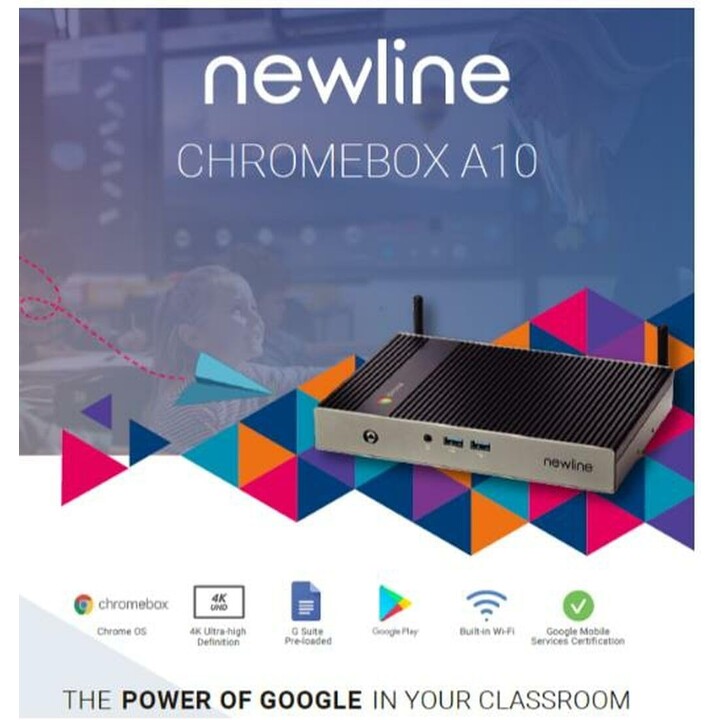

Chromebox Newline A10 for interactive displays, black
chrome box
The NewLine A10 Chrome Box is a compact and powerful media player designed for digital signage, kiosks, and conference room applications. Powered by an Intel Celeron N3350 processor and 4GB of RAM, it delivers smooth performance for web-based content and applications. With dual HDMI 2.0 outputs, it can drive two 4K displays simultaneously, making it ideal for multi-screen setups.
Running on Chrome OS, the A10 offers a secure and easy-to-manage platform with automatic updates and built-in virus protection. Connectivity options include four USB 3.0 ports, Gigabit Ethernet, and 802.11ac Wi-Fi, ensuring fast data transfer and reliable network connections. The fanless design ensures silent operation, perfect for noise-sensitive environments.
| Processor | Intel Celeron N3350 (dual-core, up to 2.4 GHz) |
| RAM | 4GB LPDDR4 |
| Storage | 32GB eMMC |
| Graphics | Intel HD Graphics 500 |
| Video Output | 2x HDMI 2.0 (up to 4K@60Hz) |
| USB Ports | 4x USB 3.0 |
| Networking | Gigabit Ethernet, 802.11ac Wi-Fi, Bluetooth 4.2 |
| Audio | 3.5mm headphone/mic combo, HDMI audio |
| Operating System | Chrome OS |
| Power | 12V DC, 3A (36W) |
| Dimensions | 148 x 105 x 30 mm |
| Weight | 0.5 kg |
-
Brand

-
ReferenceA10
-
In stock4 Items
-
ConditionNew
-
EAN138500083443050
-
MPNA10
-
ColourBlack
-
ConectividadWiFi 802.11ac, Bluetooth 4.2
-
Memoria RAM4 GB DDR3L
-
Almacenamiento32 GB eMMC
-
Sistema operativoChromeOS
| Brand | NewLine |
|---|---|
| Country | USA |
| Address of origin | 101 East Park Blvd. Suite 807 Plano, TX 75074 |
| EU responsible person | Newline Interactive Inc. |
| Address | onda de Poniente, Nº2, 1ª planta, Oficina 1B, 28760, Tres Cantos, Madrid, Spain |
| [email protected] | |
| Phone | +34 91 052 8834 |
Safety warnings
General warnings for this type of product. Always follow the manufacturer's instructions.
- Read the manufacturer's instructions before installing or using the appliance and keep them.
- Connect it only to a mains supply of the stated voltage and use the power supply or cable provided.
- Do not use it with a damaged cable, plug or casing and do not open it: repairs by qualified personnel only.
- Protect it from moisture, liquids and heat, and keep the ventilation openings clear.
- Unplug it before cleaning and when it will not be used for a long time.
- Keep it out of the reach of children.
- At the end of its life, take it to a collection point for waste electrical and electronic equipment (WEEE).
12 other products in the same category

- Out-of-Stock

- New


- New
- Out-of-Stock