- Out-of-Stock



Multifunction monochrome laser pantum bm4200dw 33ppm 256mb duplex rj45 wifi bt usb tray 250 toner
- Monochrome laser multifunction printer
- Print speed up to 33 pages per minute
- 256MB memory with duplex printing
- Connectivity: RJ45, Wi-Fi, Bluetooth, USB
- 250-sheet toner tray capacity
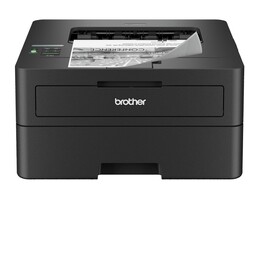
The Pantum BM4200DW is a high-performance monochrome laser multifunction printer designed to meet the demands of busy offices and home environments. With a fast print speed of up to 33 pages per minute and 256MB of memory, this printer ensures smooth and efficient operation. It supports duplex printing, allowing you to save paper by printing on both sides automatically.
Connectivity options include RJ45 Ethernet, Wi-Fi, Bluetooth, and USB, providing versatile ways to connect and print from multiple devices. The 250-sheet toner tray reduces the need for frequent refills, making it ideal for medium to high volume printing tasks.
Whether you need to print, scan, or copy, the Pantum BM4200DW offers reliable performance with crisp monochrome output. Its compact design fits well in various workspaces, combining functionality with convenience.
-
Brand

-
ReferenceBM4200DW
-
ConditionNew
-
EAN136936358059077
-
MPN169-IPABM4200DW
-
Tecnología de impresiónLáser monocromo
-
Resolución de impresión1200 x 1200 DPI
-
ConectividadWiFi, Bluetooth, Ethernet RJ45, USB 2.0
-
Battery includedNo
| Brand | PANTUM |
|---|---|
| Country | China |
| Address of origin | 3883 Zhuhai Avenue, Xiangzhou District, Zhuhai, Guangdong, China |
| EU responsible person | Pantum (Holland) B.V. |
| Address | Energieweg 113, Mijdrecht, Netherlands, 3641 RT |
| [email protected] | |
| Phone | 31297789380 |
Safety warnings
General warnings for this type of product. Always follow the manufacturer's instructions.
- Read the manufacturer's instructions before installing or using the appliance and keep them.
- Connect it only to a mains supply of the stated voltage and use the power supply or cable provided.
- Do not use it with a damaged cable, plug or casing and do not open it: repairs by qualified personnel only.
- Protect it from moisture, liquids and heat, and keep the ventilation openings clear.
- Unplug it before cleaning and when it will not be used for a long time.
- Keep it out of the reach of children.
- At the end of its life, take it to a collection point for waste electrical and electronic equipment (WEEE).
12 other products in the same category




Viewed products