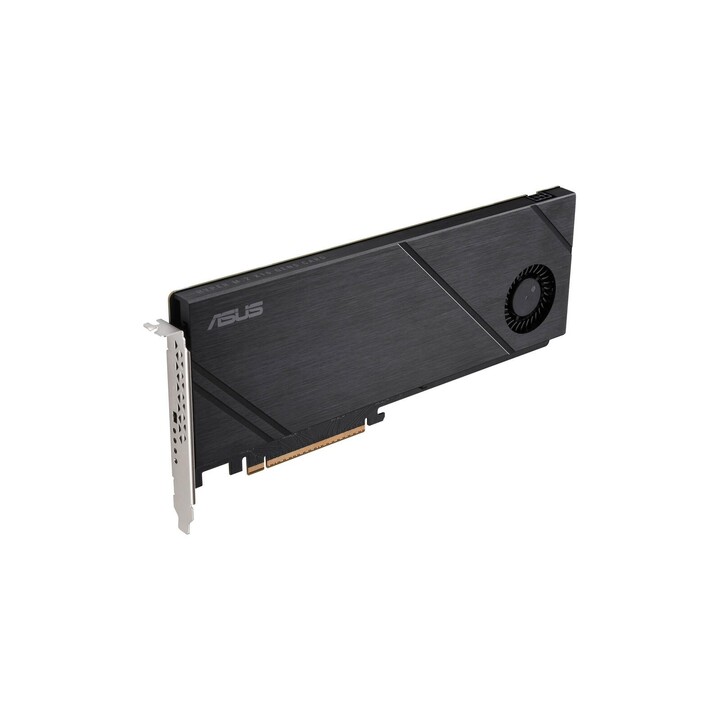

ASUS interface adapter Hyper M.2 x16 Gen5 Card
- Supports up to four NVMe M.2 SSDs (2242/2260/2280/22110)
- PCIe 5.0 x16 interface, backward compatible with PCIe 4.0/3.0
- Total bandwidth up to 512 Gbps (64 GB/s)
- Active cooling fan with aluminum heatsink
- LED status indicators for each M.2 slot
ASUS interface adapter Hyper M.2 x16 Gen5 Card
The ASUS Hyper M.2 x16 Gen5 Card is a high-performance expansion card designed to maximize NVMe SSD storage and speed. It allows you to install up to four M.2 NVMe SSDs in a single PCIe 5.0 x16 slot, delivering aggregate bandwidth of up to 512 Gbps. This card is ideal for content creators, gamers, and professionals who require ultra-fast data transfer and large storage capacity.
Equipped with an active cooling solution, the Hyper M.2 x16 Gen5 Card ensures stable performance even under heavy workloads. The aluminum heatsink and dedicated fan effectively dissipate heat from the SSDs, preventing thermal throttling. LED indicators provide at-a-glance status for each M.2 slot, making it easy to monitor drive activity. Backward compatible with PCIe 4.0 and 3.0, this card offers future-proof connectivity for the latest storage technology.
| Interface | PCIe 5.0 x16 |
| M.2 Slots | 4 x M.2 (Key M) |
| Supported M.2 Sizes | 2242, 2260, 2280, 22110 |
| Maximum Bandwidth | 512 Gbps (64 GB/s) |
| Cooling | Active fan + aluminum heatsink |
| LED Indicators | Per-slot activity status |
| Dimensions | 222 x 100 x 20 mm |
| Weight | 200 g |
-
Brand

-
Reference90MC0CY0-M0EAY0
-
In stock2 Items
-
ConditionNew
-
EAN134711387353288
-
MPN90MC0CY0-M0EAY0
| Brand | ASUS |
|---|---|
| Country | Taiwan |
| Address of origin | 15 Li-Te Road, Beitou District, Taipei 112, Taiwan |
| EU responsible person | ASUS Computer GmbH |
| Address | Harkortstr. 21-23, 40880 Ratingen, Germany |
| [email protected] | |
| Phone | +49-2102-5789555 |
Safety warnings
General warnings for this type of product. Always follow the manufacturer's instructions.
- Read the manufacturer's instructions before installing or using the appliance and keep them.
- Connect it only to a mains supply of the stated voltage and use the power supply or cable provided.
- Do not use it with a damaged cable, plug or casing and do not open it: repairs by qualified personnel only.
- Protect it from moisture, liquids and heat, and keep the ventilation openings clear.
- Unplug it before cleaning and when it will not be used for a long time.
- Keep it out of the reach of children.
- At the end of its life, take it to a collection point for waste electrical and electronic equipment (WEEE).
12 other products in the same category
- Out-of-Stock

- Out-of-Stock

- Out-of-Stock



- Out-of-Stock

- Out-of-Stock

Viewed products
- Out-of-Stock

- New


- Out-of-Stock