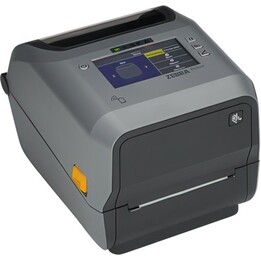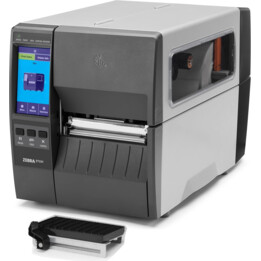
Thermal transfer label printer Zebra ZD421T 300 dpi 102 mm/s Ethernet and Bluetooth
The Zebra ZD421T is a thermal transfer label printer built for businesses that need sharp, durable labels day after day. With 300 x 300 DPI resolution and a print speed of 102 mm/s, it suits environments where barcodes, product labels and identification tags have to stay legible. It connects over Ethernet, Bluetooth 5.0 or USB, so it fits into both wired office networks and wireless workflows.
Highlights
- Thermal transfer printing at 300 x 300 DPI: produces crisp text and barcodes that remain readable on labels used for stock, shipping or asset tracking.
- Print speed of 102 mm/s with a maximum print width of 10.8 cm: handles everyday label runs without slowing down your workflow.
- Wired and wireless connectivity with Ethernet, Bluetooth 5.0 (including Bluetooth Low Energy) and a USB 2.0 port: lets you place the printer where it is needed and connect it to different devices.
- Supports labels up to 0.991 m long and rolls up to 12.7 cm in diameter, with media thickness from 0.08 to 0.19 mm: gives you room to work with a range of label formats.
- 256 MB internal memory and 512 MB flash memory: stores label formats and data on the device itself.
- Page description languages EPL2, ZPL II, XML and ZBI: works with existing Zebra label workflows and tools.
- Built-in LCD screen: shows printer status at a glance so you can check it without a computer.
Technical specifications
Printing
| Print technology | Thermal transfer |
|---|---|
| Maximum resolution | 300 x 300 DPI |
| Number of printable dots | 12 dot |
| Print speed | 102 mm/sec |
| Maximum printing width | 10.8 cm |
Paper handling
| Maximum label length | 0.991 m |
|---|---|
| Maximum roll diameter | 12.7 cm |
| Media thickness | 0.08 - 0.19 mm |
Ports & interfaces
| Connectivity technology | Wired & Wireless |
|---|---|
| Ethernet LAN | Yes |
| Wi-Fi | No |
| Bluetooth | Yes |
| Bluetooth version | 5.0 |
| Bluetooth Low Energy (BLE) | Yes |
| USB port | Yes |
| USB 2.0 ports quantity | 1 |
Performance
| Page description languages | EPL2, XML, ZBI, ZPL II |
|---|---|
| Internal memory | 256 MB |
| Flash memory | 512 MB |
Design
| Product colour | Grey |
|---|---|
| Built-in display | Yes |
| Display | LCD |
Power
| AC input voltage | 100 - 240 V |
|---|---|
| AC input frequency | 50-60 Hz |
System requirements
| Windows operating systems supported | Yes |
|---|---|
| Mobile operating systems supported | Android, iOS |
Operational conditions
| Operating relative humidity (H-H) | 10 - 90% |
|---|---|
| Storage relative humidity (H-H) | 5 - 95% |
| Operating temperature (T-T) | 4.4 - 41 °C |
| Storage temperature (T-T) | -40 - 60 °C |
Weight & dimensions
| Width | 202 mm |
|---|
Manufacturer technical data.
Frequently asked questions
Can I connect it to my network and to a phone or tablet?
Yes. The printer offers Ethernet for a wired network connection, Bluetooth 5.0 for wireless links, and a USB 2.0 port. It supports Windows as well as Android and iOS mobile operating systems.
What label sizes does it handle?
It prints up to 10.8 cm wide, accepts labels up to 0.991 m long and takes rolls with a maximum diameter of 12.7 cm. Media thickness can range from 0.08 to 0.19 mm.
Does it have a display?
Yes, it has a built-in LCD screen, so you can check the printer's status directly on the device.
What are the power requirements?
The printer accepts an AC input of 100 to 240 V at 50-60 Hz, so it can be used with standard mains supplies in different regions.
-
Brand

-
ReferenceZD4A043-30EE00EZ
-
In stock6 Items
-
ConditionNew
-
EAN135704174529460
-
MPNZD4A043-30EE00EZ
-
Tecnología de impresióntransferencia térmica
-
Velocidad de impresión102 mm/s
-
Resolución de impresión300 x 300 ppp
-
ConectividadInalámbrico y alámbrico
| Brand | Zebra |
|---|---|
| Country | USA |
| Address of origin | 3 Overlook Point, Lincolnshire, Illinois 60069 |
| EU responsible person | Zebra Technologies Corp. |
| Address | Calle Martinez Villergas, 52 Bloque C Madrid 28027 |
| [email protected] | |
| Phone | 34911237350 |
Safety warnings
General warnings for this type of product. Always follow the manufacturer's instructions.
- Read the manufacturer's instructions before installing or using the appliance and keep them.
- Connect it only to a mains supply of the stated voltage and use the power supply or cable provided.
- Do not use it with a damaged cable, plug or casing and do not open it: repairs by qualified personnel only.
- Protect it from moisture, liquids and heat, and keep the ventilation openings clear.
- Unplug it before cleaning and when it will not be used for a long time.
- Keep it out of the reach of children.
- At the end of its life, take it to a collection point for waste electrical and electronic equipment (WEEE).
12 other products in the same category